FASTA, FASTQ, BAM and VCF: Bioinformatics File Formats Explained
A beginner's guide to the files every genomics project runs on. Follow one real coronavirus sample from FASTQ to BAM to VCF, decode quality scores, SAM flags and CIGAR strings, and avoid the off-by-one error that can hide a mutation.

- #FASTA
- #FASTQ
- #SAM
- #BAM
- #VCF
- #BED
- #GFF
- #bioinformatics
- #genomics
- #file formats
Every genomics project is a relay of files. A sequencer writes one, an aligner reads it and writes another, and a variant caller reads that and writes a third. The tutorials that teach these tools usually assume you already know what is inside each file. So the first weeks of bioinformatics can feel like following a recipe written in a language you cannot read.
The good news is that the core formats are plain text, or a compact binary form that one command turns back into text. Each one is built around a single question:
- FASTA: what is the sequence?
- FASTQ: what did the sequencer read, and how sure was it?
- SAM and BAM: where in the genome did each read come from?
- VCF: where does this sample differ from the reference?
- BED and GFF: where are the regions that matter?
This guide reads each format line by line, using real files. We follow one public SARS-CoV-2 sample from the sequencer to its list of mutations. The coronavirus genome is small, about 30,000 letters, so every file stays small enough to open. Its best-known mutations also make the output easy to check. Human, mouse and bacterial projects use exactly the same formats.
By the end you will be able to:
- say which format holds what, and the order in which a pipeline produces them
- read a FASTQ record and turn its quality characters into error rates
- decode a SAM line, including its flag and its CIGAR string
- read a VCF line and say what it reports
- move between BED and GFF coordinates without the classic off-by-one error
- look inside any of these files with a single command
You need no programming experience. The commands near the end are for a Mac or Linux terminal, and each one is explained.
The big picture: one sample, a chain of files
A sequencing project moves its data through a fixed chain of formats, and each step adds one answer. Figure 1 shows the chain for the sample we follow in this guide. It is run ERR4246990 in the European Nucleotide Archive: a swab collected in England on 4 April 2020 and sequenced by the COVID-19 Genomics UK consortium. All of its files are public.
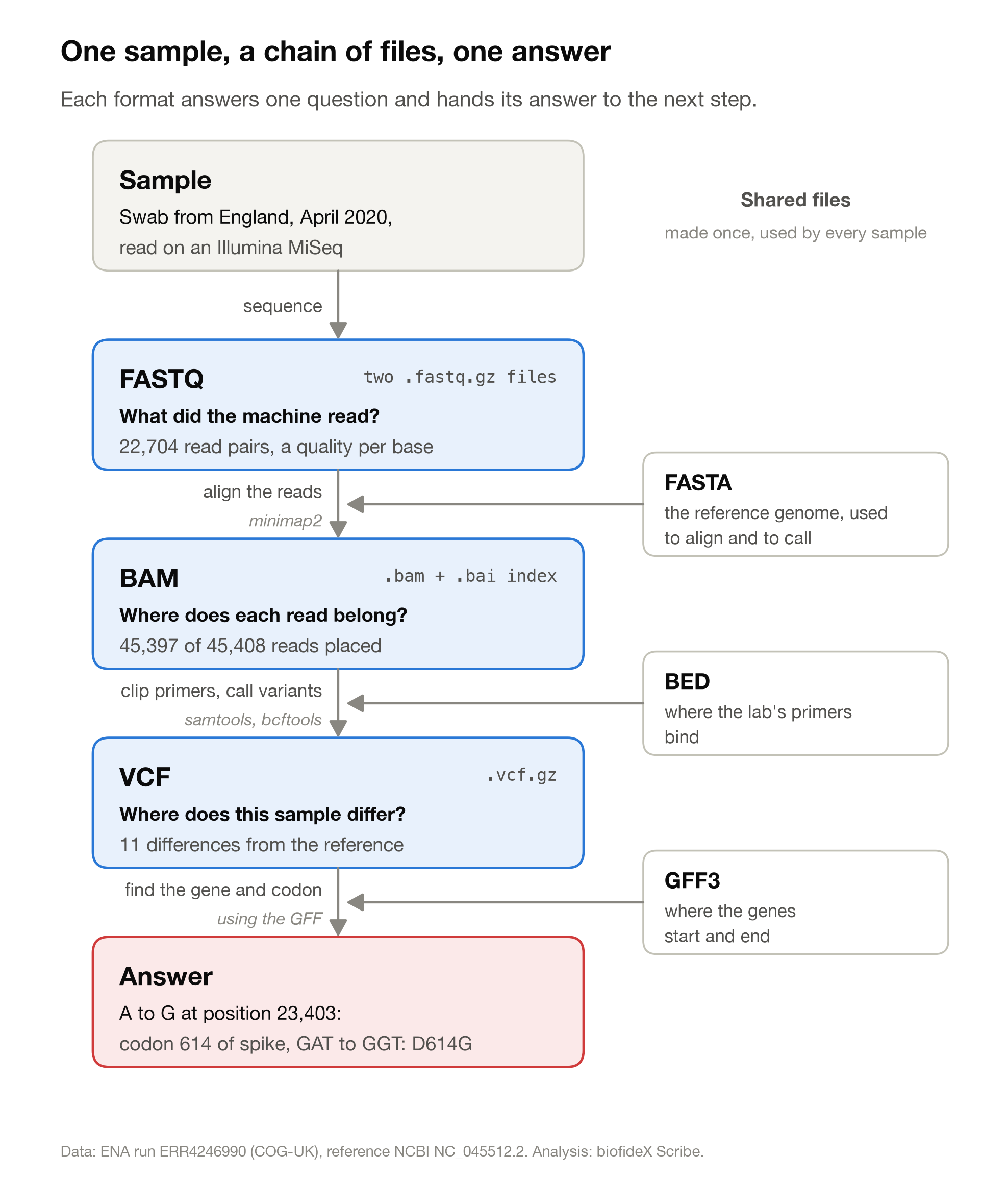
Read from top to bottom, the chain runs like this:
- The sequencer writes FASTQ files: the raw reads, each with a quality score for every base. Nothing yet says where in the genome a read came from.
- An aligner compares each read with the reference genome, stored as FASTA, and writes a SAM or BAM file: every read with its position.
- A variant caller reads the aligned reads position by position and writes a VCF file listing only the places where the sample differs. On the way, a BED file of primer positions told the pipeline which bases to ignore.
- An annotation file in GFF format says which gene, and which codon, each difference falls in. That is how "A to G at 23,403" becomes "D614G".
Two things are worth noticing.
First, each step condenses the one before. 45,408 reads become 45,397 reads with a place on the genome, which become 11 differences, which become one sentence about a protein. Each step keeps only what the next question needs.
Second, there are two kinds of file. FASTQ, BAM and VCF belong to one sample. FASTA, GFF and BED are shared: the first two describe the reference genome, and the BED file describes the primers of the lab protocol. Every sample sequenced the same way uses the same three. Most of the mistakes later in this guide happen where a sample's files meet a reference file that does not quite match.
FASTA: a sequence and its name
FASTA is the simplest format in the field. Each record is a name line that starts with >, followed by the sequence. There is no quality score and no position. It is just letters.
Here are the first lines of the reference genome our sample will be compared against, downloaded from NCBI:
>NC_045512.2 Severe acute respiratory syndrome coronavirus 2 isolate Wuhan-Hu-1, complete genome
ATTAAAGGTTTATACCTTCCCAGGTAACAAACCAACCAACTTTCGATCTCTTGTAGATCTGTTCTCTAAA
CGAACTTTAAAATCTGTGTGGCTGTCACTCGGCTGCATGCTTAGTGCACTCACGCAGTATAATTAATAAC
TAATTACTGTCGTTGACAGGACACGAGTAACTCGTCTATCTTCTGCAGGCTGCTTACGGTTTCGTCCGTG
The name line
Everything after > up to the first space is the sequence's identifier: here, NC_045512.2. The rest of the line is a free-text description for humans. Most tools keep only the identifier, so that is the name every other file must use when it refers to this sequence.
The .2 is a version number. When a database corrects a sequence, it keeps the accession and raises the version, so NC_045512.1 and NC_045512.2 are different sequences.
The sequence lines
The line breaks mean nothing. This file wraps every 70 letters, which gives 427 full lines and a last line of 13. Other files wrap at 60 or 80, or not at all. Joined up, the letters spell the whole genome: 29,903 bases, of which 8,954 are A, 5,492 C, 5,863 G and 9,594 T.
A few other characters appear in real files:
- N means any base. Genome assemblies use runs of N for gaps they could not fill.
- IUPAC codes stand for a set of bases, such as R for A or G and Y for C or T.
- Lowercase letters in a genome reference usually mark repeats, a convention called soft-masking. They do not mean the bases are less certain.
Many records, and proteins too
One file can hold many records, one after another, each with its own > line. A human reference genome is a single FASTA file with a record for each chromosome, and usually hundreds more for pieces of sequence not yet placed on one.
The same format carries proteins. Here is the start of the spike protein, also from NCBI:
>YP_009724390.1 surface glycoprotein [Severe acute respiratory syndrome coronavirus 2]
MFVFLVLLPLVSSQCVNLTTRTQLPPAYTNSFTRGVYYPDKVFRSSVLHSTQDLFLPFFSNVTWFHAIHV
Nothing in the format says whether a record is DNA or protein. Letters such as E, F, I, L, P and Q give a protein away. File names often help: .fna for nucleotides and .faa for amino acids, while .fa and .fasta are used for both.
Same letters, different name
The very same genome is also stored in GenBank as MN908947.3. We downloaded both and compared them: all 29,903 letters are identical. To a computer, though, they are two different sequences, because their names differ. Keep this in mind. It returns in the section on mistakes, where it silently breaks a real step of our analysis.
The index file
Tools that need one stretch of a large genome do not read the whole file. They use an index, made once with samtools faidx, which writes a small .fai file beside the FASTA:
NC_045512.2 29903 97 70 71The five columns are the name, the length in bases, the byte where the sequence starts, the letters per line and the bytes per line, counting the newline. With those numbers a program can jump straight to any position. This command fetches the 11 bases centred on position 23,403, which matters later:
$ samtools faidx NC_045512.2.fasta NC_045512.2:23398-23408
>NC_045512.2:23398-23408
TCAGGATGTTA
The A in the middle is position 23,403 of the reference. Our sample has a G there.
FASTQ: what the sequencer read, and how sure it was
A FASTQ file holds reads: short stretches of sequence exactly as the machine read them, with a quality score for every single base. Almost every sequencing project starts from FASTQ files.
Our sample was sequenced on an Illumina MiSeq. Here is one of its reads, the one we will follow through the rest of this guide:
@ERR4246990.16513 MISEQ:81:000000000-J36K7:1:1107:26392:6564/1
TAGGAGTAAGTTGATCTGCATGAATAGCAACAGGGACTTCTGTGCAGTTAACACCCTGAT…
+
BBBBBFFBFFFFGGGGGGGGGGFHHHHGHHHHHGGGGHHHHGHHGHGHHGHHHHGGHHGG…
The real sequence and quality lines are 250 characters long. They are cut at 60 here.
Four lines per read
- The name, starting with
@. The public archive added the run accession and a read number (ERR4246990.16513). The rest is the instrument's own name for the read: the machine, the run number (81), the flow cell, the lane (1), the tile (1107), and the x and y position of the DNA cluster on that tile. The final/1says this is the first read of a pair. - The sequence, one letter per base.
- A separator, a lone
+. Some older files repeat the name after it. - The quality line, one character per base, in the same order as the sequence.
Decoding the quality line
Each quality character is a number in disguise. Subtract 33 from its ASCII code and you get a Phred quality score, Q. The score converts to the chance that the base is wrong:
chance of error = 10^(-Q/10)

character   ASCII code   Q    chance the base is wrong
    5           53       20   1 in 100
    ?           63       30   1 in 1,000
    F           70       37   1 in 5,000
    H           72       39   1 in 7,900
    I           73       40   1 in 10,000
Every 10 points of Q make an error ten times less likely. Q30, one error in a thousand bases, is the usual benchmark for good data.
Our read opens with BBBBBFF: Q33, Q33, Q33, Q33, Q33, Q37, Q37. Its 54th base is a C with the quality H, Q39, about one chance in 7,900 of a misread. That C will turn out to be the most famous mutation in this sample. Across the whole run, 98.5% of the bases in the first reads score Q30 or higher, and H is the most common character.
Why 33? The ASCII codes below 33 are spaces and invisible control characters, so the scale starts at !, which stands for Q0. Illumina's own documentation describes the same rule: the character's code equals the score plus 33.
Two variations are worth knowing, one old and one new:
- Phred+64. Illumina data from before about 2011 added 64 instead of 33. A quality line full of lowercase letters such as
handeis a sign of that older encoding, and reading it as +33 inflates every score by 31. - Binned scores. Newer Illumina instruments round quality scores into a few bins to save space, so a modern file may contain only a handful of distinct quality characters. That is normal, not a fault.
Two files for one sample
Our sample came as two files, ERR4246990_1.fastq.gz and ERR4246990_2.fastq.gz, with 22,704 reads each. The machine read every DNA fragment from both ends. The first file holds the first read of each fragment, the second file the other end, and the two stay in step: record 16,513 of one file is the mate of record 16,513 of the other.
Keep that order intact. A step that filters or sorts one file and not the other breaks every pair after the first mismatch. The archive also supplied a small third file holding 13 reads whose mates had been lost.
Do not count reads by counting @
It is tempting to count reads by counting lines that start with @. But @ is also a quality character: ASCII 64, so Q31. Some quality lines begin with it.
In our first file, that shortcut reports 22,729 reads. The true number is 22,704, because 25 quality lines happen to start with @. In the second file the overcount is 86. Count the lines and divide by four instead. The commands near the end show how.
Compressed by default
FASTQ files are large. Ours are small, because this run produced only 22,704 read pairs, yet the first file still holds 12.8 MB of text. Compressed with gzip it takes 1.4 MB, and that is how it arrived. A run with hundreds of millions of reads fills many gigabytes even when compressed. Almost every tool reads .fastq.gz files directly, so there is rarely a reason to unzip one.
SAM, BAM and CRAM: where each read belongs
An aligner takes every read and finds the place in the reference genome it came from. It writes the answer as a SAM file, or as one of its compressed forms, BAM and CRAM. Each read gets a position, a direction and a base-by-base account of how it fits.
We aligned our sample with minimap2, a widely used aligner. Of 45,408 reads, 45,397 found a place in the genome, which is 99.98%.
The SAM header
A SAM file opens with header lines that start with @. Ours has three kinds:
@HD   VN:1.6   SO:coordinate
@SQ   SN:NC_045512.2   LN:29903
@PG ID:minimap2 PN:minimap2 VN:2.31-r1302 CL:minimap2 -t 4 -ax sr NC_045512.2.fasta ERR4246990_1.fastq.gz ERR4246990_2.fastq.gz- @HD gives the format version and the sort order.
SO:coordinatemeans the reads are sorted by position along the genome. - @SQ lists each reference sequence with its name and length. The name must match the FASTA exactly.
- @PG records each program that wrote to the file, with the full command. It is a built-in lab notebook, and the first place to look when you inherit a file and wonder how it was made.
Files from larger projects also carry @RG lines, which name the sample and sequencing run each read belongs to.
One line per alignment
After the header comes one line per alignment, with 11 fixed columns separated by tabs. Here is the line for the read we met in the FASTQ section, with its sequence and quality cut short:
ERR4246990.16513 83 NC_045512.2 23207 60 250M = 23123 -334 ACAGGTGTTC… FGGDF/GGFB… NM:i:1 AS:i:490 …Read column by column:
    field   our read           what it means
1   QNAME   ERR4246990.16513   the read's name, as in the FASTQ
2   FLAG    83                 a set of yes-or-no facts packed into one number
3   RNAME   NC_045512.2        the reference sequence it aligned to
4   POS     23207              the leftmost aligned base, counting from 1
5   MAPQ    60                 how sure the aligner is of this position
6   CIGAR   250M               how the read lines up, base by base
7   RNEXT   =                  where the mate aligned ("=": the same sequence)
8   PNEXT   23123              the mate's position
9   TLEN    -334               the length of the DNA fragment
10  SEQ     ACAGGTGTTC…        the bases, on the reference's strand
11  QUAL    FGGDF/GGFB…        their quality characters, as in FASTQ
The two reads of this pair together cover positions 23,123 to 23,456: a fragment of 334 bases. TLEN is positive for the left read of a pair and negative for the right one, which is why ours shows −334.
Decoding the flag
The flag packs twelve yes-or-no facts into one number. Each fact has a value, and the flag is the sum of the values that are true:
value   meaning
    1   the read is one of a pair
    2   both reads aligned as a sensible pair
    4   this read did not align
    8   its mate did not align
   16   this read aligned to the reverse strand
   32   its mate aligned to the reverse strand
   64   first read of the pair
  128   second read of the pair
  256   a secondary alignment (another possible place)
  512   failed a quality check
 1024   a PCR or optical duplicate
 2048   a supplementary alignment (part of a split read)
Our read has flag 83, and 83 = 64 + 16 + 2 + 1. It is the first read of a pair, the pair aligned sensibly, and this read faces the reverse strand. Its mate has flag 163 = 128 + 32 + 2 + 1: the second read, with its partner on the reverse strand.
You never need to do this sum by hand. The command samtools flags 83 prints 0x53 83 PAIRED,PROPER_PAIR,REVERSE,READ1: the flag in hexadecimal, then in decimal, then in words.
In our file, four flags cover nearly every read: 99 and 147, and 83 and 163. They are the two ways a pair can lie on the genome, one read pointing right and its mate pointing left. A flag outside that set is worth a second look. Flag 2145, for example, marks a supplementary alignment: part of a read that only aligns in two separate pieces. Our file has 42 supplementary alignments, 33 of them with exactly this flag.
The read has been turned around
Compare the sequence with the FASTQ. There, our read began TAGGAGTAAG. Here it begins ACAGGTGTTC.
Nothing is wrong. A SAM file always writes a read on the reference's forward strand. Flag 16 means the read came from the other strand, so its sequence is stored reverse-complemented and its quality line reversed. The specification requires this, and it trips up everyone who tries to match SAM lines back to FASTQ by eye.
That turn moves our special base. The C at position 54 of the FASTQ read becomes a G at position 197 of the stored sequence. Counting from POS, it sits on genome position 23,207 + 196 = 23,403. The reference has an A there. The tag NM:i:1 confirms that the read differs from the reference at exactly one base.
CIGAR: how the read lines up
The CIGAR string describes the alignment as counts and letters. 250M means 250 bases aligned in a row. M covers matches and mismatches alike, so our read's mutation hides inside it. The other common letters are:
letter  meaning                                           example
  M     aligned base (match or mismatch)                  250M
  I     extra bases in the read, not in the genome        100M2I148M
  D     bases of the genome missing from the read         116M3D134M
  N     a long skip, such as an intron in RNA-seq         50M1200N50M
  S     bases kept in SEQ but left out of the alignment   22S227M
  H     bases cut from SEQ altogether                     30H220M
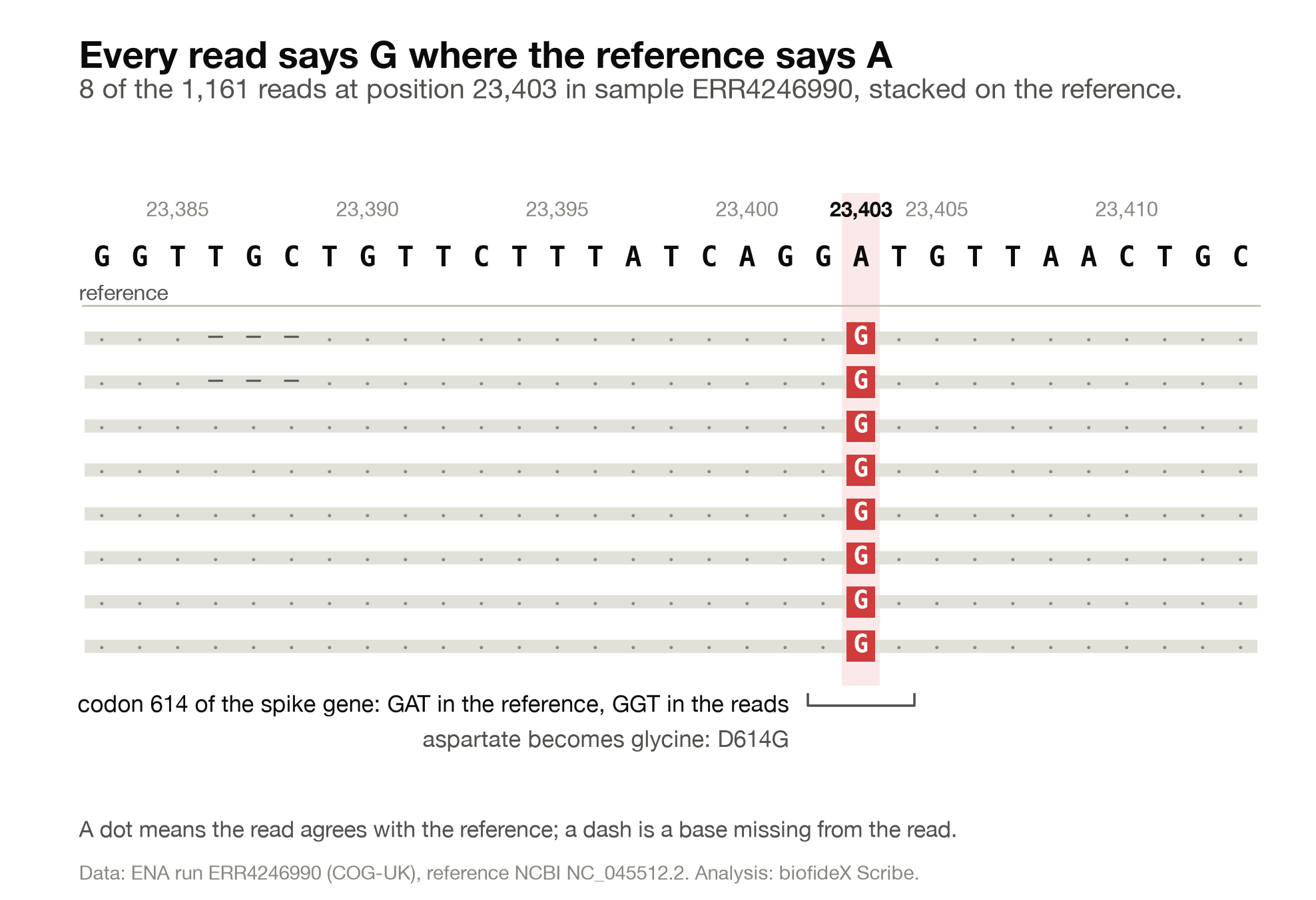
Two of these examples come from our own sample. Eight reads that cover position 23,403 carry 116M3D134M: 116 aligned bases, three bases of the genome missing, then 134 more. That is eight reads out of 1,161 at this spot. The variant caller rightly treated them as noise.
The other example shows a pipeline step at work. Our sample was prepared with the ARTIC V3 primer set, which copies the genome by PCR as 98 overlapping pieces of about 400 bases, called amplicons. The bases at each end of an amplicon are copied from a primer, not from the virus, so a standard step marks them as soft-clipped. The mate of our read, the second read of the pair ERR4246990.16513, began at position 23,123 with CIGAR 249M. After clipping it begins at 23,145 with 22S227M. Its first 22 bases are still in the file, but they no longer count as evidence. The primer list that drove this step is a BED file, which we meet below.
MAPQ: how sure is the position?
MAPQ is another Phred-scaled number, like a base quality, but for the whole read's position. Higher means the aligner is more confident it chose the right place. A value of 0 means the read fits equally well somewhere else, which happens in repeats. minimap2 tops out at 60, and in this small viral genome, with few repeats, all but 296 of the 45,439 mapped records scored 60.
After the 11 fixed columns come optional tags, written as TAG:TYPE:VALUE. NM is the number of differences from the reference. AS is the aligner's own score. Each aligner adds tags of its own.
Three files, one content
SAM, BAM and CRAM hold the same information in different encodings. For our sample:
format   size      what it is
SAM      28.9 MB   plain text, one line per alignment
BAM       2.9 MB   the same records in binary, compressed in blocks
CRAM      2.0 MB   stores each read as its differences from the reference
BAM is the everyday working format. Sorted by position and indexed with samtools index, which writes a small .bai file, it lets a tool jump straight to a region. One command pulls the 1,161 reads that cover position 23,403 in an instant, without reading the rest of the file.
CRAM is the most compact, and large archives increasingly store it. Its catch is in the description: because each read is stored as differences from the reference, you need the exact same reference FASTA to read the file back.
VCF: where this sample differs from the reference
A variant caller walks along the genome, looks at the aligned reads at each position, and writes down where the sample disagrees with the reference. The result is a VCF file, short for Variant Call Format. It is far smaller than the files before it: for our 29,903-base genome it holds 11 records. A human genome gives millions.
Figure 2 shows what the caller sees at the position that matters most in our sample.
We called variants with bcftools. Here is the file, trimmed to the fields this section explains:
##fileformat=VCFv4.2
##contig=<ID=NC_045512.2,length=29903>
##INFO=<ID=DP,Number=1,Type=Integer,Description="Raw read depth">
##FORMAT=<ID=GT,Number=1,Type=String,Description="Genotype">
##FORMAT=<ID=AD,Number=R,Type=Integer,Description="Allelic depths (high-quality bases)">
#CHROM       POS    ID  REF  ALT  QUAL     FILTER  INFO     FORMAT  ERR4246990
NC_045512.2  241    .   C    T    225.417  .       DP=427   GT:AD   1:0,214
NC_045512.2  3037   .   C    T    225.417  .       DP=95    GT:AD   1:0,48
NC_045512.2  14408  .   C    T    225.417  .       DP=474   GT:AD   1:0,237
NC_045512.2  23403  .   A    G    225.417  .       DP=1158  GT:AD   1:0,1146
NC_045512.2  28881  .   G    A    225.417  .       DP=82    GT:AD   1:0,41
NC_045512.2  28882  .   G    A    225.417  .       DP=82    GT:AD   1:0,41
NC_045512.2  28883  .   G    C    225.417  .       DP=82    GT:AD   1:0,41
These are 7 of the 11 records. bcftools wrote a dozen more statistics on each line, and we removed them for clarity. In the real file the columns are separated by tabs.
The VCF header
Lines starting with ## describe the file. They give the format version and list the reference sequences, whose names must match the FASTA and the BAM. They also define every abbreviation that appears later. When you meet an unfamiliar code in a VCF, its definition is in the header.
The line starting with a single # names the columns. The first eight are always there. When the file holds samples, a ninth column, FORMAT, describes their values, and from the tenth onward there is one column per sample. Ours has one sample; a population study can have thousands.
Reading one line
Take the record at position 23,403:
- CHROM and POS:
NC_045512.2, position 23,403. VCF counts from 1, like SAM. - ID:
.means no identifier. Human VCFs often carry a database name here, such as anrsnumber from dbSNP. - REF and ALT: the reference has A, the sample has G.
- QUAL: 225.4, a Phred-scaled confidence that the ALT allele is real. Like base qualities, higher is more certain. 225.4 is the top of bcftools' scale, which is why 10 of our 11 records share it.
- FILTER:
.means no filters were applied.PASSwould mean the record passed every filter, and a code such asq10would name a filter it failed. A dot is not the same as PASS. - INFO:
DP=1158, the number of reads at this position. - FORMAT and the sample column:
GT:ADis the template for the sample's value,1:0,1146. So GT is1, and AD is0,1146: 0 reads showed A and 1,146 showed G.
GT is the genotype. A virus carries one copy of its genome, so one number is enough: 0 means the reference allele and 1 the first ALT allele. In human data each person has two copies, so you will see 0/0, 0/1 (one copy of each, heterozygous) and 1/1. A | in place of the /, as in 0|1, means the caller knows which copy carries which allele.
Why is AD sometimes about half of DP? At position 241, DP is 427 but AD adds up to 214. DP counts reads. AD counts only the bases the caller used, and where the two reads of a pair overlap, it counts that base once, so as not to count one DNA fragment twice. At position 23,403 the mates do not overlap, so the two numbers nearly agree.
Position 23,403 also shows why one site can carry three different counts. 1,161 reads overlap it. The caller sets aside reads whose placement is uncertain, which leaves the 1,158 counted in DP. AD then counts only bases with a quality of at least 20, which leaves 1,146. Every one of them is a G.
What these lines say about the virus
Four of the records, at 241, 3,037, 14,408 and 23,403, are a famous set. The change at 23,403 alters the spike protein and is known as D614G. A large study of how it spread found that this form carries three companion changes: C241T, C3037T and C14408T. It also found that the G614 form became the most common worldwide in 2020. Our sample, collected in the UK in April 2020, has all four.
The VCF itself does not say any of that. It says "A to G at 23,403", not "D614G in the spike protein". Turning positions into genes and amino acids takes an annotation file, which is the next section.
One change, two spellings
Positions 28,881 to 28,883 changed from GGG to AAC. bcftools wrote that as three single-base records. Another tool could write one record instead:
NC_045512.2 28881 . GGG AAC …Both say the same thing. But a script that compares two VCFs line by line will report a disagreement. Before comparing variant files from different tools, normalise them. For example, bcftools norm --atomize splits multi-base records into single bases.
Insertions and deletions
An insertion or deletion is written with one extra base: the base just before the event, which both REF and ALT include. POS then points at that base.
Some reads in our sample, mentioned in the CIGAR section, lacked the three bases at 23,386 to 23,388 (TGC). The caller rightly ignored them. Had the deletion been real, the record would read:
NC_045512.2 23385 . TTGC T …At position 23,385 the reference reads TTGC, and the sample reads only T.
Indels have a spelling problem of their own. Deleting TGC at 23,386 to 23,388 leaves exactly the same sequence as deleting GCT at 23,387 to 23,389. The convention is to write every indel at its leftmost possible position, and bcftools norm -f NC_045512.2.fasta moves a file's indels there.
What a missing line means
A VCF like ours lists only the differences. If a position is not listed, either the sample matched the reference there, or there were too few reads to tell. The file cannot say which.
In our sample that matters. We counted the reads at every position of the genome: 3,221 positions, about 11%, had fewer than 10 good reads. The longest gap runs from 19,912 to 20,496. Another, from 21,147 to 21,682, covers the start of the spike gene. A mutation there would simply be missing from this file. To tell "no change" from "no data", look at the coverage in the BAM, or ask the caller for a file that records every position.
BED, GFF and GTF: regions, genes and the off-by-one trap
Annotation files mark regions of a genome: where genes start and stop, where primers bind, which stretches a lab chose to sequence. Two families cover most of them. BED lists simple regions. GFF and GTF describe genes and their parts. The two families count positions differently, and that one difference causes more silent errors than anything else in this guide.
GFF3: genes and their parts
NCBI publishes a GFF3 annotation alongside the reference genome. These are its two lines for the spike gene, with some attributes left out:
NC_045512.2  RefSeq  gene  21563  25384  .  +  .  ID=gene-GU280_gp02;Name=S;gene_biotype=protein_coding;…
NC_045512.2  RefSeq  CDS   21563  25384  .  +  0  ID=cds-YP_009724390.1;Parent=gene-GU280_gp02;product=surface glycoprotein;…
Every line has nine tab-separated columns:
#  column      spike gene    meaning
1  seqid       NC_045512.2   the sequence, named as in the FASTA
2  source      RefSeq        who made the annotation
3  type        gene          gene, mRNA, exon, CDS and so on
4  start       21563         first base, counting from 1
5  end         25384         last base, included
6  score       .             optional; "." when empty
7  strand      +             which strand the feature is on
8  phase       .             CDS only: bases before the first full codon
9  attributes  ID=…;Name=S   name=value pairs, separated by ";"
Both ends are included, so the gene is 25,384 − 21,563 + 1 = 3,822 bases long. That is 1,273 codons plus a stop codon, which matches the 1,273 amino acids of the spike protein.
The ID and Parent attributes link lines into a tree. The CDS line names the gene as its parent. In a human annotation, the tree runs from a gene to several transcripts, and from each transcript to its exons and coding pieces. NCBI's file for this virus has 11 genes, along with untranslated regions, structural RNA elements and 27 entries for the smaller proteins cut from the two long polyproteins.
GTF: the same idea, an older spelling
GTF is a close relative of an older GFF version. Ensembl and GENCODE distribute annotations in it, and many RNA-seq tools ask for it. It has the same nine columns and the same 1-based coordinates. The main difference is the last column, written as key "value"; pairs:
NC_045512.2 RefSeq transcript 21563 25384 . + . transcript_id "gene-GU280_gp02"; gene_id "gene-GU280_gp02"; gene_name "S"That is the spike gene again, converted from the NCBI file with the tool gffread. Tools that read GTF look for gene_id and transcript_id in that last column. Give one a GFF3 file and it may fail, or quietly count nothing, so convert first.
One more difference catches people out. In the GTF files from Ensembl and GENCODE, a CDS line stops before the stop codon, which gets a line of its own. Written that way, the spike CDS would end at 25,381, not 25,384.
BED: a list of regions
BED is the leanest format here. Only three columns are required: the sequence name, a start and an end. Name, score, strand and display settings may follow.
The primers used to amplify our sample are published as a BED file. These are the two primers of amplicon 77:
MN908947.3  23122  23144  nCoV-2019_77_LEFT   1  +
MN908947.3  23500  23522  nCoV-2019_77_RIGHT  1  -
The fifth column normally holds a score from 0 to 1,000. Here it holds the primer pool, 1 or 2, instead. BED files often bend their optional columns like this, so read the notes that come with one. Notice the sequence name too: MN908947.3, not NC_045512.2. That detail returns in the next section.
The off-by-one trap
The two families count positions differently:
- BED numbers the first base of a sequence 0, and its end position is not part of the region.
- GFF, GTF, SAM and VCF number the first base 1 and include both ends.
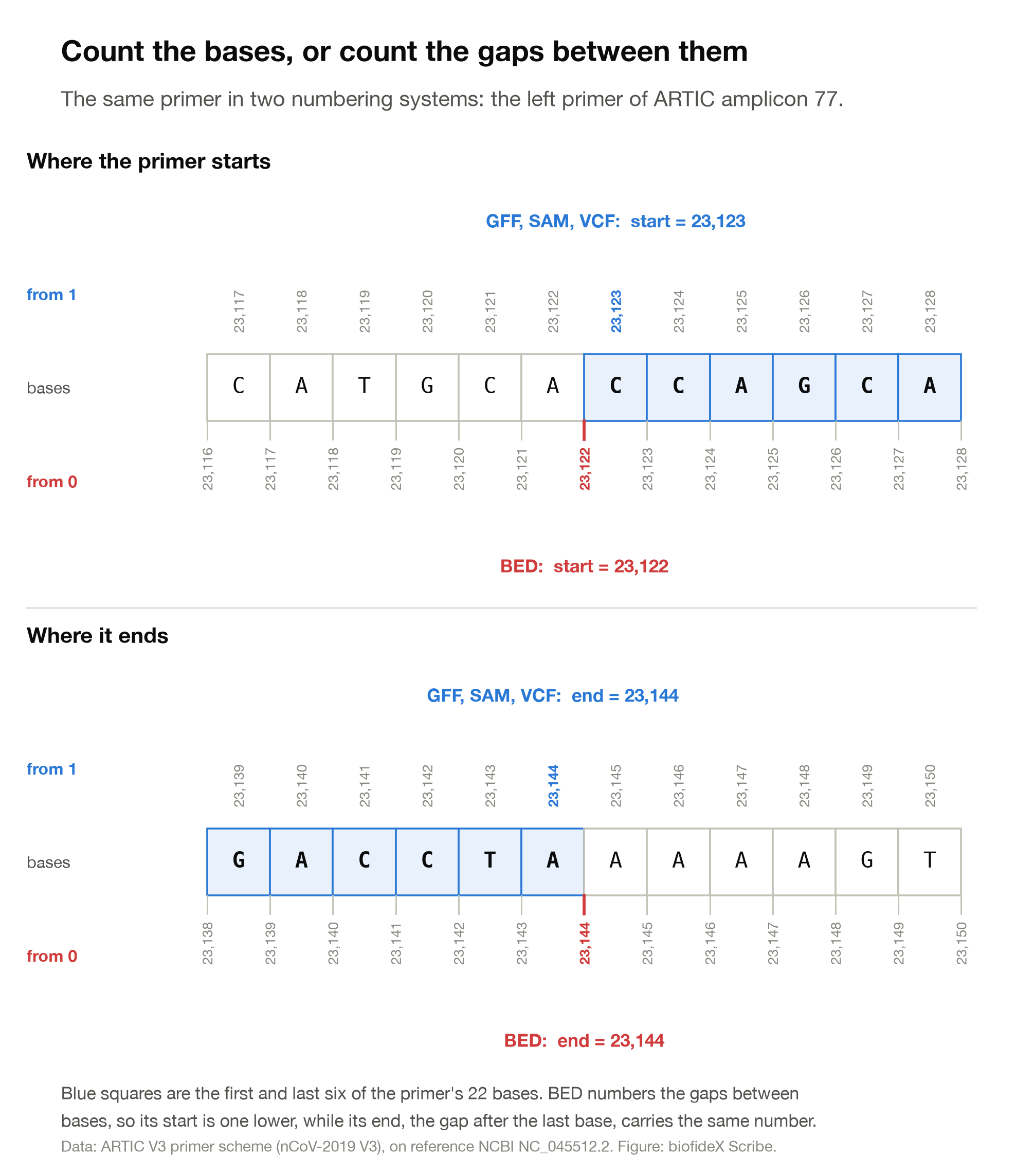
The two descriptions are one rule seen two ways. Number the gaps between bases from 0, and the region from gap 23,122 to gap 23,144 holds exactly the bases that a 1-based system numbers 23,123 to 23,144.
Take the left primer of amplicon 77. The BED file says 23122 to 23144. In BED's system that is 23,144 − 23,122 = 22 bases, the first of which sits at position 23,123 in everyone else's numbering.
Our BAM file confirms it. The mate of our read, the second read of the pair ERR4246990.16513, begins with this primer, and it aligns at POS 23,123, not 23,122. After the primer is clipped, it starts 22 bases later, at 23,145.
The conversions are short enough to memorise:
1-based (GFF, GTF, SAM, VCF)  ->  BED:   start - 1,   end unchanged
BED  ->  1-based:                       start + 1,   end unchanged
length of a BED region:                 end - start
length of a GFF region:                 end - start + 1
So the spike gene, at 21,563 to 25,384 in the GFF, is 21562 25384 in a BED file.
Why one base matters: the D614G test
Here is the arithmetic that turns our VCF line into biology. It uses the change at 23,403 and the start of the spike gene from the GFF:
position of the change (VCF)     23,403
start of the S gene (GFF)        21,563
bases of the gene before it      23,403 - 21,563 = 1,840
whole codons before it           1,840 / 3 = 613, with 1 base left over
so the change is                 the 2nd base of codon 614
codon 614 in the reference       positions 23,402-23,404 = GAT   aspartate (D)
codon 614 in our sample          GGT                             glycine (G)
Aspartate becomes glycine at position 614 of the spike protein: D614G.
Now make the classic mistake and take the gene's start from a BED file, 21,562, without adding 1:
bases of the gene before it      23,403 - 21,562 = 1,841
whole codons before it           613, with 2 bases left over
so the change is                 the 3rd base of codon 614
codon 614 in the reference       positions 23,401-23,403 = GGA   glycine
codon 614 in our sample          GGG                             glycine
The most closely watched mutation of 2020 now looks like a silent change that does nothing to the protein. Nothing crashes and no warning appears. The answer is simply wrong.
Annotation tools such as SnpEff and Ensembl's Variant Effect Predictor do this arithmetic for you. They get it right only when every file uses the numbering the tool expects.
Mistakes that cost beginners days
Most format mistakes do not crash anything. They produce output that looks normal and is wrong. We reproduced the ones that apply to our sample, so the messages quoted are real.
1. Sequence names that do not quite match
This is the most common silent failure, and it happened during the making of this guide.
Our reads were aligned to NC_045512.2. The primer BED file, exactly as published, names the same genome MN908947.3. We ran the primer-clipping step with that file. The tool finished normally, exited without an error, printed nothing on screen, and clipped none of the 45,450 alignment records, because no region in the BED file was on a sequence it could find. The only clue sat in its optional statistics file, which listed all 45,450 as EXCLUDED. After we renamed the sequence in the BED file, the same command clipped 45,199.
In this sample the missed step happened not to change the final list of 11 variants. That was luck. Bases copied from a primer reflect the primer, not the virus, and studies of amplicon sequencing find that primer problems distort variant measurements. That is why the standard pipelines soft-clip primers using exactly this kind of BED file.
Human data has its own version of this: UCSC names chromosomes chr1, chr2 and so on, while Ensembl names them 1, 2. Before joining any two files, list the names each one uses and compare them.
2. Mixing genome builds
A position only means something on the reference it was measured against. Human data comes on two main builds, GRCh37 (also called hg19) and GRCh38 (hg38). From any one provider, both builds use the same chromosome names, such as chr1 in hg19 and hg38, so comparing names will not catch the mix-up. The coordinates differ, though, and so do the lengths: chromosome 1 is 249,250,621 bases long in GRCh37 and 248,956,422 in GRCh38.
A VCF made on one build and annotated with a GFF from the other gives confident, wrong answers. The headers tell you which build a file belongs to: check the sequence lengths in the @SQ lines of a BAM and the ##contig lines of a VCF.
3. Off by one
Coordinates from a BED file used as if they were GFF coordinates, or the reverse, shift everything by one base. The D614G example in the previous section shows what that does to a codon. When you move a region between formats, convert it, and test the conversion on one feature whose answer you already know.
4. Plain gzip where bgzip is needed
Large VCF and BED files are indexed with a tool called tabix, which needs a special form of gzip compression called BGZF, made by the tool bgzip. A file compressed with ordinary gzip looks the same and opens normally, but cannot be indexed:
$ tabix -p vcf plain.vcf.gz
[tabix] the compression of 'plain.vcf.gz' is not BGZF
Compress with bgzip instead. Any program that reads gzip can still read the result.
5. Unsorted or out-of-date indexes
A BAM must be sorted by position before it can be indexed. Try to index an unsorted one and samtools stops:
[E::hts_idx_push] Unsorted positions on sequence #1: 26664 followed by 10667The opposite trap is quieter. If you rebuild a BAM and keep the old .bai beside it, tools may read the new file through the old index. samtools does warn, but the warning scrolls past easily and the command still runs:
[W::hts_idx_load3] The index file is older than the data file: stale.bam.baiRebuild the index whenever you rebuild the file.
6. Paired files that drift apart
As the FASTQ section explained, record N of one file must stay the mate of record N in the other. Use tools that take both files at once, and check that the read names still match at the start and end of both.
7. Opening genomics files in a spreadsheet
Spreadsheets guess what a cell contains, and they guess wrong for biology. With default settings, Microsoft Excel turns gene names such as SEPT2 and MARCH1 into dates. A scan of leading genomics journals found such errors in roughly one fifth of papers that shared gene lists as Excel files. The problem was serious enough that in 2020 the committee that names human genes renamed every symbol Excel converted, so SEPT1 is now SEPTIN1 and MARCH1 is now MARCHF1. Older files still carry the old names.
Look at genomics files in a terminal or a text editor. If you must use a spreadsheet, import every column as text.
8. Reading silence as "no change"
As the VCF section showed, a position missing from a VCF may simply have had no reads. Before you claim a sample lacks a mutation, check the coverage there. The next section shows how.
Look inside any of them yourself
You do not need a pipeline to read these files. A handful of terminal commands will show you what is inside any of them. Every command below was run on the files from this guide, and the outputs shown are what it printed, with the spacing tidied for reading.
Setting up
The plain-text formats need nothing beyond a Mac or Linux terminal. On Windows, install the Windows Subsystem for Linux first. To make and read BAM and VCF files you need minimap2, samtools and bcftools. The simplest way to install them is in an environment of their own, from the Bioconda channel of the conda package manager:
conda create -n formats -c conda-forge -c bioconda minimap2 samtools bcftools htslib
conda activate formats
To follow along with our sample, download ERR4246990_1.fastq.gz and ERR4246990_2.fastq.gz from the European Nucleotide Archive, and the reference genome NC_045512.2 in FASTA and GFF3 from NCBI. The links are in the sources at the end.
Then build the BAM and VCF files from them. These commands run the alignment and variant calling described in this guide, without the primer clipping. On this sample they give the same 11 variants:
samtools faidx NC_045512.2.fasta
minimap2 -ax sr NC_045512.2.fasta ERR4246990_1.fastq.gz ERR4246990_2.fastq.gz \
  | samtools sort -o ERR4246990.bam -
samtools index ERR4246990.bam
bcftools mpileup -f NC_045512.2.fasta -d 100000 -q 20 -Q 20 -a AD,DP ERR4246990.bam \
  | bcftools call --ploidy 1 -mv -Oz -o ERR4246990.vcf.gz
bcftools index ERR4246990.vcf.gz
Each step takes seconds on a sample this size. Two things will look slightly different from this guide. Your VCF names its sample column ERR4246990.bam, after the file, because the reads carry no sample name of their own. bcftools may also warn that MQ should be declared as Type=Float. That refers to a line in the header it wrote, and is harmless here.
One tip applies to every format: less -S filename opens a file one screen at a time without wrapping long lines, so each record stays on one row. Press q to leave.
FASTA
$ grep '>' NC_045512.2.fasta
>NC_045512.2 Severe acute respiratory syndrome coronavirus 2 isolate Wuhan-Hu-1, complete genome
This lists the name line of every record, which tells you how many sequences the file holds and what they are called. To count the bases, join the sequence lines and count the characters:
Keep the quotes around >. Without them, the shell reads > as "write into this file" and empties your FASTA.
$ grep -v '>' NC_045512.2.fasta | tr -d '\n' | wc -c
29903
FASTQ
$ gzip -cd ERR4246990_1.fastq.gz | head -n 4This prints the first read, all four lines. On a Mac, use gzip -cd rather than zcat. The macOS zcat looks for an old .Z file and fails on a .gz file with "can't stat".
To count the reads, count the lines and divide by four:
$ echo $(( $(gzip -cd ERR4246990_1.fastq.gz | wc -l) / 4 ))
22704
BAM
$ samtools view -H ERR4246990.bam            # the header
$ samtools view ERR4246990.bam | head -n 3   # the first three alignments
$ samtools flagstat ERR4246990.bam           # a summary of the flags
$ samtools flags 83                          # decode one flag
With an index (samtools index ERR4246990.bam), you can ask about a single position. This counts the reads covering the D614G site:
$ samtools view -c ERR4246990.bam NC_045512.2:23403-23403
1161
To check coverage, samtools depth prints the number of reads at each position. Position 20,000 sits in one of the gaps from the VCF section:
$ samtools depth -a -r NC_045512.2:20000-20000 ERR4246990.bam
NC_045512.2   20000   1
To see the reads stacked as in Figure 2, run samtools tview -p NC_045512.2:23390 ERR4246990.bam NC_045512.2.fasta, or open the BAM in IGV, a free genome browser.
CRAM works with the same commands, as long as samtools can find the reference FASTA.
VCF
$ bcftools view -h ERR4246990.vcf.gz    # the header only
$ bcftools view -H ERR4246990.vcf.gz    # the records only
To pull out just the columns you care about, bcftools query takes a template:
$ bcftools query -f '%CHROM\t%POS\t%REF\t%ALT\n' ERR4246990.vcf.gz | head -n 4
NC_045512.2   241     C   T
NC_045512.2   3037    C   T
NC_045512.2   10097   G   A
NC_045512.2   13216   T   G
GFF and GTF
To see what kinds of features an annotation holds, count the third column:
$ awk -F'\t' '!/^#/ && NF { print $3 }' NC_045512.2.gff3 | sort | uniq -c | sort -rn
  27 mature_protein_region_of_CDS
  13 CDS
  11 gene
   5 stem_loop
   1 three_prime_UTR
   1 region
   1 five_prime_UTR
To list the genes with their positions:
$ awk -F'\t' '$3 == "gene"' NC_045512.2.gff3 | cut -f1,4,5,9BED, and the check that would have saved us
$ cut -f1 nCoV-2019.primer.bed | sort -u
MN908947.3
$ samtools view -H ERR4246990.bam | grep '^@SQ'
@SQ   SN:NC_045512.2   LN:29903
The first command lists the sequence names a BED file uses. The second lists the names in the BAM. They differ, and that is the mistake from the previous section caught in two lines. Run this comparison whenever two files meet for the first time.
Cheat sheet
format   holds                        positions             look inside with
FASTA    sequences and their names    none                  grep '>'
FASTQ    reads + base qualities       none                  gzip -cd | head -n 4
SAM      where each read aligned      from 1                less -S
BAM      SAM, compressed              from 1                samtools view
CRAM     SAM, stored against a ref    from 1                samtools view
VCF      differences from reference   from 1                bcftools view
GFF/GTF  genes and their parts        from 1, both ends     awk, cut
BED      regions                      from 0, end left out  cut, sort
The small files that travel with them are indexes. Each one lets a tool jump to a region without reading the whole file, and each must be rebuilt whenever its file changes:
index          belongs to
.fai           FASTA      (samtools faidx)
.bai or .csi   BAM        (samtools index)
.crai          CRAM       (samtools index)
.tbi or .csi   VCF, BED   (tabix or bcftools index, after bgzip)
What to take away
The formats look intimidating because they are dense, not because they are complicated. Each one answers a single question, and a pipeline simply passes the answer along.
- FASTA says what the sequence is. A name line, then letters. The name is what every other file must use.
- FASTQ says what the machine read, and how sure it was. Four lines per read. Subtract 33 from a quality character's code to get Q, and every 10 points of Q make an error ten times less likely.
- SAM, BAM and CRAM say where each read belongs. The flag is a sum of yes-or-no facts, the CIGAR spells out the fit, and a read on the reverse strand is stored turned around.
- VCF says where the sample differs. One line per difference, counted from 1. A position that is not listed may simply have had no reads.
- BED, GFF and GTF say where things are. BED counts from 0 and leaves its end out. The others count from 1 and include both ends.
- Names and builds must match across every file. Most silent failures start with a file that calls the same sequence by another name, or measures it on another build.
The habit that ties these together is cheap: before you run a tool on a file, look at its header and its first few lines. When a result looks strange, go back and read the files that produced it. Every line in them now means something to you.
Sources and methods
The sample and how it was processed
The sample is run ERR4246990 in the European Nucleotide Archive, submitted by the COVID-19 Genomics UK consortium as COG-UK/LIVE-9EBAC. It was collected in England on 4 April 2020 by Liverpool Clinical Laboratories, amplified by PCR as overlapping amplicons and sequenced on an Illumina MiSeq. The metadata does not name the primer scheme. We used ARTIC V3, because 98% of the reads start or end within two bases of one of its primer sites. We downloaded its FASTQ files from ENA and confirmed their MD5 checksums.
The reference genome and its annotation are NCBI's NC_045512.2, in FASTA and GFF3. The primer positions are the ARTIC V3 primer BED file.
Reads were aligned with minimap2 2.31 in its short-read mode (-ax sr), then sorted and indexed with samtools 1.24. Primers were soft-clipped with samtools ampliconclip --both-ends --strand, using the BED file with its sequence name changed to NC_045512.2. Variants were called with bcftools 1.24 (mpileup -f NC_045512.2.fasta -d 100000 -q 20 -Q 20 -a AD,DP, then call --ploidy 1 -mv). Coverage was measured with samtools depth -a -q 20 -Q 20. The GTF line was converted with gffread 0.12.9, and read statistics came from seqkit 2.14.0. The analysis was run in October 2026.
This is a teaching pipeline, chosen to make each file easy to read. Public-health laboratories use validated pipelines with further quality checks.
Format specifications
FASTQ. Cock PJA and colleagues (2010). The Sanger FASTQ file format for sequences with quality scores, and the Solexa/Illumina FASTQ variants. Nucleic Acids Research 38(6): 1767-1771.
Quality scores. Illumina. Quality Scores, Illumina Connected Software documentation.
SAM and BAM. The SAM/BAM Format Specification Working Group. Sequence Alignment/Map Format Specification, version of 12 August 2025.
CRAM. CRAM format specification, version 3.1.
VCF. The Variant Call Format Specification, VCFv4.5, version of 25 February 2026.
GFF3. Stein L. Generic Feature Format Version 3, version 1.26.
BED. UCSC Genome Browser. Data File Formats: BED.
Tools
minimap2. Li H (2018). Minimap2: pairwise alignment for nucleotide sequences. Bioinformatics 34(18): 3094-3100.
samtools and bcftools. Danecek P and colleagues (2021). Twelve years of SAMtools and BCFtools. GigaScience 10(2): giab008.
gffread. Pertea G, Pertea M (2020). GFF Utilities: GffRead and GffCompare. F1000Research 9: 304.
Further reading
D614G and its companion mutations. Korber B and colleagues (2020). Tracking changes in SARS-CoV-2 spike: evidence that D614G increases infectivity of the COVID-19 virus. Cell 182(4): 812-827.
Why primers are clipped. Grubaugh ND and colleagues (2019). An amplicon-based sequencing framework for accurately measuring intrahost virus diversity using PrimalSeq and iVar. Genome Biology 20: 8.
Spreadsheets and gene names. Ziemann M, Eren Y, El-Osta A (2016). Gene name errors are widespread in the scientific literature. Genome Biology 17: 177.
The 2020 gene renaming. Bruford EA and colleagues (2020). Guidelines for human gene nomenclature. Nature Genetics 52(8): 754-758.
Reactions
From QuizLab
Test Your Knowledge
Quizzes on the same ground as this article. Pick one and see how much stuck.
- BioinformaticsBeginnerIntro to Bioinformatics9questionsStart Quiz
- BioinformaticsIntermediateSequence Alignment14questionsStart Quiz
- BioinformaticsAdvancedPhylogenetic Tree Construction13questionsStart Quiz
- BioinformaticsAdvancedNext-Generation Sequencing (NGS)13questionsStart Quiz
- GenomicsAdvancedGenome Annotation14questionsStart Quiz
- GenomicsIntermediateComparative Genomics14questionsStart Quiz
Keep Reading
More from Scribe
Articles on related ground, and the newest from Scribe.
 Bioinformatics
How to Read a Volcano Plot: Fold Change, P-Values and FDR Explained
A beginner's guide to the most misread figure in genomics: what each axis means, why adjusted p-values matter, six ways the plot misleads, and how to draw one yourself in R or Python. Every figure uses real, public data.
biofideXOctober 14, 202629 min read Research Insights
AlphaFold 3 to IsoDDE: How AI Drug Discovery Got Twice as Accurate in 18 Months
DeepMind's AlphaFold 3 reshaped structural biology in 2024. By mid-2026, Isomorphic Labs' IsoDDE has more than doubled accuracy on the hardest protein-ligand systems.
biofideX5 min read Career Guidance
What Can You Do With a Biology Degree? Career Paths and the Skills Each One Needs
Choose the work, not the job title. A practical guide to biology careers: a typical day, the way in and the first skill for each path, which need a PhD, real UK graduate data, and how to test a path in a month.
biofideXOctober 14, 202626 min read Evolutionary Biology
How to Read a Phylogenetic Tree: A Step-by-Step Guide With Practice Trees
Learn to read any evolutionary tree with one simple rule. Built from real primate DNA, this beginner's guide covers clades, rotations, branch lengths, bootstrap values and roots, with eight practice trees and worked answers.
biofideXOctober 14, 202629 min read